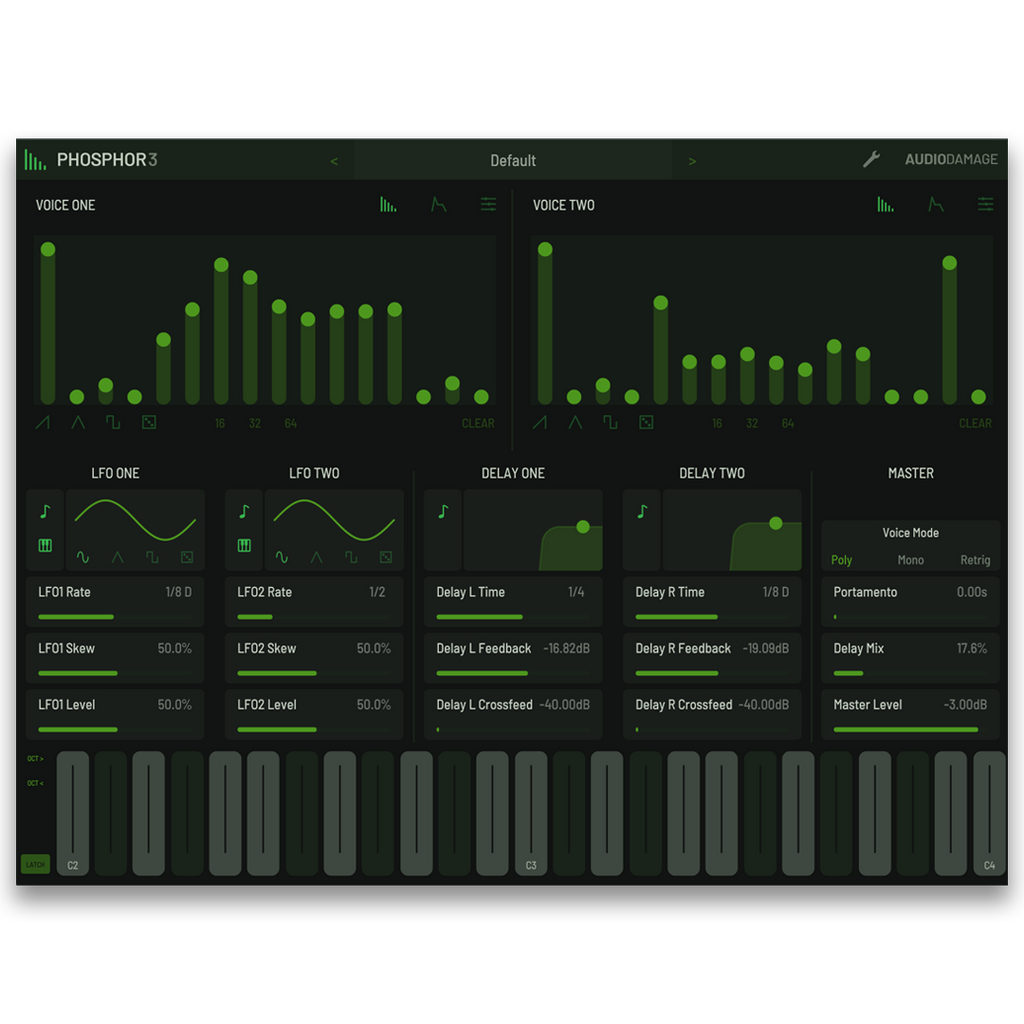
Phosphor 3 is an additive synthesizer plugin by Audio Damage for macOS, Windows, Linux, and iOS. It is modeled on the alphaSyntauri, an early-1980s digital additive synthesizer that needed an Apple IIe to run, and puts that sound in your DAW with 16-note polyphony and modern modulation. Every note plays two voices, each with an additive wavetable oscillator of 16, 32, or 64 partials, a noise source, an ADSR envelope, and its own level and pan. Vintage modes bring back the original's low-resolution wavetables and shift-register noise, and cross modulation lets each oscillator frequency-modulate the other. Two LFOs, a modulation panel with eight sources, two delays with filtered feedback, full MPE support, and MTS-ESP and TUN microtuning round it out, along with 43 factory presets and designer banks from Red Means Recording and Ken Flux Pierce. Available as VST3, AU, AAX, and CLAP for desktop, and AUv3 for iPad. Priced at $59 USD with no DRM, no subscription, and a perpetual license.
Platforms & Downloads
Fully functional demo. 20-minute session timer, save disabled.
Documentation
Phosphor 3 Owner's Manual
PDF · 870 KB · English
Features
-
Two voices per note. Voice One and Voice Two each have an additive wavetable oscillator, a noise source, an ADSR level envelope, and level and pan controls, with transpose of up to 24 semitones and fine tuning of up to 100 cents either way.
-
Additive oscillators. Set 16, 32, or 64 partials with individual level sliders, start from saw, triangle, or square settings, or randomize the partials for a new spectrum built on a strong fundamental.
-
Vintage modes. Switch each oscillator to a low-resolution wavetable and each noise source to shift-register noise that tracks the note you play, individually, for the digital grit of the original hardware.
-
Cross modulation. Each oscillator can frequency-modulate the other, much like the Synclavier's FM. A voice keeps modulating its partner with its level turned all the way down, so it can serve purely as a modulator.
-
Envelopes. An ADSR level envelope for each voice, with attack, decay, and release times from 2 ms to 2 seconds and a curve control for each of those three stages.
-
Two LFOs. Sine, triangle, square, and random shapes from 0.01 to 14 Hz or synced to host tempo, running globally or per note. Skew sets the pulse width, bends the triangle into a rising or falling ramp, and smooths the random steps.
-
Modulation panel. Right-click a control, or double-tap it on iPad, to open its modulation panel and set bipolar amounts from eight sources: both LFOs, velocity, aftertouch, pitch bend, mod wheel, CC 74, and T-Rand, a new random value with every note. The oscillator, LFO, and delay controls can all be modulated.
-
Two delays. Delay One and Delay Two each run up to 2 seconds or sync to tempo, with their own feedback, crossfeed into the other side, and a band-pass filter of adjustable center and width in the feedback path, plus a shared mix control.
-
Voice modes. Poly with 16-note polyphony, Mono with legato, and Retrig, plus adjustable portamento.
-
MPE. Full MPE support for per-note pitch bend, pressure, and timbre, with adjustable aftertouch smoothing and a pitch bend range of up to 48 semitones.
-
Microtuning. Native ODDSound MTS-ESP support connects automatically when an MTS-ESP master is running, or load any tuning as a TUN file, and set A4 anywhere from 220 to 880 Hz.
-
On-screen keyboard. Play from the built-in keyboard, made for touch screens: scroll sideways to move along the keys and up or down to resize them, with an indicator for MPE pitch bend.
-
Preset browser. Folders, favorites, ZIP import and export, and copy and paste, with 43 factory presets in Bass, FX, Keys, Leads, and Pads, and 38 designer presets from Red Means Recording and Ken Flux Pierce.
-
Universal preset system. Cross-platform XML-based presets compatible across all plugin formats and operating systems, including the iPad edition. Save over the Default preset to start every new instance from your own settings.
-
Resizable vector UI. HiDPI and Retina aware, and scales cleanly from a laptop panel to a large display. The Default button in Settings stores the window size, MPE mode, bend range, A4 reference, and tuning table for new instances.
Sound Design Ideas
Pull the even partials out of a saw in Voice One for a hollow, reedy tone, then detune Voice Two a few cents and pan the two apart for width. Switch one oscillator to vintage mode and leave the other clean to hear the early-80s grit against a modern top end. Raise cross modulation with short decays for bells and metallic plucks, or turn Voice Two all the way down so it only modulates Voice One. Send T-Rand to fine tune for a little drift from note to note, set Delay One and Delay Two to different synced times with some crossfeed for a bouncing stereo echo, and play it from an MPE controller with pressure on the noise level.
Frequently Asked Questions
What is Phosphor 3?
Phosphor 3 is an additive synthesizer plugin modeled on the alphaSyntauri. Each note plays two voices with additive wavetable oscillators of up to 64 partials, noise, and their own envelopes, and the plugin adds vintage low-resolution modes, cross modulation, two LFOs, a modulation panel, two delays, MPE, and microtuning, with 16-note polyphony.
What was the alphaSyntauri?
The alphaSyntauri was a digital additive synthesizer from the early 1980s that needed an Apple IIe computer to run. Phosphor follows its two-voice additive design and its vintage digital character, and runs in any DAW without the computer the original depended on.
Does Phosphor 3 support MPE and microtuning?
Yes. Phosphor 3 has full MPE support for per-note pitch bend, pressure, and timbre, with aftertouch smoothing and a bend range of up to 48 semitones. For microtuning it connects to ODDSound MTS-ESP automatically and loads tunings in TUN format, and A4 can be set from 220 to 880 Hz.
Does Phosphor 3 work on iPad?
Yes. Phosphor 3 is available as an AUv3 plugin and standalone app for iPad with iOS 12 or later, sold separately on the App Store. It has an on-screen keyboard made for touch, and its presets are compatible with the desktop versions.
Does Phosphor 3 work on Linux?
Yes. Phosphor 3 is available as CLAP, VST3, and LV2 for Ubuntu 22 and later. macOS, iOS, and Windows builds are also available. All Audio Damage plugins are released for Linux alongside macOS, iOS, and Windows.
What plugin formats does Phosphor 3 support?
CLAP, VST3, and AAX on Windows 10 or newer. CLAP, VST3, AAX, and AudioUnit on Intel and Apple Silicon macOS 10.13 or newer. CLAP, VST3, and LV2 on Ubuntu 22 or later. AUv3 on iPad with iOS 12 or later, sold separately on the App Store. All desktop builds are 64-bit.
Can I save my own starting point?
Yes. Save over the Default preset in the User folder, and every new instance of Phosphor 3 starts from your settings. The Default button in the Settings panel also stores your window size, MPE mode, bend range, A4 reference, and tuning table for new instances.
Does Phosphor 3 use copy protection, require a subscription, or need iLok?
No. Like all Audio Damage products, Phosphor 3 uses no copy protection of any kind. You can install your purchase on every machine you own. It is a perpetual license, not a subscription, and there is no online activation requirement after install.